Buy Youtubers Life at the Best Price

  • PC

Top retailers

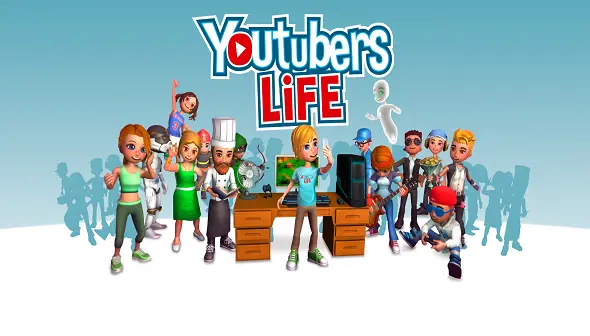
    Have you ever wondered how a day in the life of a YouTuber looks like? Well, Youtubers Life is a video game that will allow you to play as a YouTuber. The game is a life simulation/tycoon video game about being a content creator. You will work your way to the top by editing your videos, expanding your fanbase, and becoming rich in the process. In Youtubers Life you will create your character and start your career from the comfortable chair that you sat every day in. Yes, you still live with your parents, so your beginnings are humble. Start your broadcasts and try to attract views by making truly interesting content and being different from other YouTubers. You will have to work daily and make progress in your social life so you can increase your popularity, but don't forget to deal with your fans, friends, and family. Always make sure you manage your time efficiently. You can become the next big thing on YouTube, whether it's as a gamer, a music star, or a Cooking Channel. Want to be a famous gamer that attends to presentations of new games, buys classic and new consoles, and then records his gameplay sessions and gets paid for it? You can do that. Want to be a famous internet music star that plays 30 different instruments and is a master at every music genre? That can publish cover videos, music lessons, and even duets? You can do that. You can even become a world known Cooking Channel which gives the best cooking advice on YouTube. Youtubers Life will truly show you the joys and the hardships of being a YouTuber. Be a famous gamer, internet music star, or a Cooking Channel. Discover if you have what it takes to constantly make interesting content that will get you paid!

    Best deals for Youtubers Life

    FAQ - Frequently Asked Questions

    What is the 'collaboration' system in Youtubers Life, and how does it impact my channel's reach and potential income?
    Collaborations allow you to team up with other in-game YouTubers. By joining forces, you can gain exposure to their audience, potentially increasing your subscriber count and view numbers. Successful collabs often lead to higher ad revenue and unlock new opportunities for future projects. Choose collaborators wisely based on their niche and audience overlap to maximize benefits.
    How do 'channel upgrades' function, and which ones offer the most significant boost to my channel's progression?
    Channel upgrades are permanent improvements to your YouTube channel that you can purchase with in-game currency. These range from increasing the number of videos you can upload daily to unlocking advanced editing features or boosting your video's visibility. Prioritize upgrades that directly increase your earning potential or unlock new content types, such as 'Subscriber Milestones' for immediate boosts or 'Advanced Editing Suite' for better video quality.
    Explain the 'simulator mode' within Youtubers Life. How does it differ from the career mode and what are its primary benefits?
    Simulator mode is a sandbox experience where you can freely experiment with video creation, audience engagement, and monetization without the long-term progression goals of career mode. It's ideal for testing new video concepts, understanding how different editing choices affect viewership, or simply practicing the core mechanics. While it doesn't impact your main career, it's a valuable tool for learning and strategy development.
    What are 'energy' and 'mood' points, and how do they influence my ability to create content and manage my YouTuber persona?
    Energy and mood are crucial resources that dictate your character's effectiveness. Low energy limits the actions you can perform, such as filming or editing, and can negatively impact video quality. A low mood can lead to decreased productivity and even character burnout. Managing these by resting, eating, and engaging in leisure activities is vital for sustained content creation.
    How does the 'audience feedback' system work, and what is the best way to respond to both positive and negative comments?
    Audience feedback is displayed through comments on your videos. Positive comments can boost your mood and provide encouragement, while negative comments can lower your mood and, if ignored or handled poorly, can even decrease subscriber loyalty. Responding constructively to negative feedback, addressing valid criticisms, and engaging with your community fosters a stronger connection and can turn detractors into fans.
    What is the role of 'equipment' in video production, and how does upgrading my gear impact the final output and my channel's professionalism?
    Your equipment, such as cameras, microphones, and lighting, directly affects the quality of your videos. Better equipment results in higher video resolution, clearer audio, and a more professional look, which in turn can attract more viewers and lead to better engagement. Investing in equipment upgrades is essential for producing high-tier content and competing effectively.
    Describe the 'event' system. How can participating in or organizing events contribute to my YouTuber career growth?
    Events are special in-game occurrences, such as gaming conventions, award ceremonies, or even themed video challenges. Participating in or hosting these events can expose your channel to new audiences, boost your popularity, and unlock unique rewards or sponsorship opportunities. Strategic participation in relevant events can significantly accelerate your fame and fortune.
    What is the 'skill tree' system, and how should I strategically allocate points to develop my YouTuber's abilities?
    The skill tree allows you to unlock and enhance specific abilities related to content creation, editing, audience interaction, and business management. You gain skill points by leveling up. Allocate points based on your chosen niche and playstyle. For instance, focus on editing skills if you plan to create highly polished videos, or on social skills to build a strong community.
    How does the 'inspiration' mechanic influence the video creation process, and how can I effectively manage it to maximize video quality?
    Inspiration acts as a resource, directly impacting the quality of your videos. Different video types require specific inspiration types, like 'Gaming' or 'Music.' You gain inspiration by engaging in activities tied to the relevant category, such as playing games or listening to music. Managing it involves balancing your time between content creation and inspiration-gathering activities to keep the content fresh and high-quality.
    What is the significance of 'trends' and how do they impact the performance of my videos and channel growth?
    Trends represent popular topics and video styles at any given time. Creating videos aligned with current trends boosts their visibility and engagement, resulting in more views and subscribers. To leverage trends, you must monitor the in-game trend system, which provides clues about what viewers are interested in, then adapt your content to capitalize on the current trends to optimize your channel's growth.

    Patch Notes

    • 1.6.4 - 14/02/25 (Update 1.6.4 Youtubers Life OMG)
    • 1.6.3 - 28/06/22 (NEW HOTFIX 1.6.3.h IS NOW LIVE)
    • 1.6.3 - 23/06/22 (HOTFIX 1.6.3.g IS NOW LIVE!)
    • 23/03/22 (Fixed MAC OS launch problems)
    • 1.6.3e - 15/03/22 (HOTFIX 1.6.3e IS NOW LIVE!)
    • 1.6.3c - 10/11/21 (NEW UPDATE 1.6.3c IS LIVE!)
    • 1.6.3 - 05/08/21 (Update 1.6.3.b is now available!)
    • 1.5.1 - 19/12/19 (New Update 1.5.1)
    • 23/07/19 (Here's a sneak peek of the upcoming Fashion Channel)
    • 1.4.2 - 05/04/19 (New Languages! 1.4.2 brings Turkish, Polish and Chinese.)
    • 1.4 - 07/02/19 (Youtubers Life 1.4 update is here!)
    • 1.4 - 15/01/19 ([OPEN BETA] Come test the first 1.4 build! Also, an amazing contest ;))
    • 1.3 - 11/12/18 (The 1.3 Update is now live!)
    • 1.3 - 27/11/18 ([OPEN BETA] Join the open beta and try the new 1.3 OMG Update!)
    • 1.0.4 - 07/04/17 ([1.0.4]The #YachtChallenge and wardrobe update!)
    • 1.0.3 - 23/02/17 ([1.0.3]General bug fixing patch.)
    • 1.0.2 - 17/02/17 ([1.0.2]Youtubers Life welcomes Tux)
    • 03/02/17 (Youtubers Life future development and roadmap)
    • 1.0.0 - 02/02/17 ([1.0.0]Youtubers Life Full Release - Bye bye Early Access!)
    • 0.9.3 - 20/01/17 ([0.9.3][Mac]The Mac build is live!)
    • 0.9.3 - 19/01/17 ([0.9.3][PC] The User Experience Update is live!)
    • 0.9.3b - 17/01/17 ([PUBLIC BETA][PC] 0.9.3b - The User Experience update.)
    • 0.9.2 - 09/01/17 ([0.9.2][Mac] 0.9.2 is out for Mac too)
    • 0.9.2 - 05/01/17 ([0.9.2][PC] First 2017 update!)
    • 0.9.1 - 22/12/16 ([0.9.1] The Xmas Update)
    • 0.9.0 - 16/12/16 ([0.9.0][Mac]The Mac build is out!)
    • 0.9.0 - 15/12/16 ([0.9.0][PC]The COOKING CHANNEL is out!)
    • 0.8.2p8 - 13/12/16 ([UPDATE]0.8.2p8 - Bug fixing)
    • 09/12/16 (The COOKING CHANNEL launches on December 15th!)
    • 0.8.2 - 28/11/16 ([0.8.2] Music Channel gets balanced - Update)
    • 0.8.2b1 - 18/11/16 ([PUBLIC BETA][PC] 0.8.2b1 - Music channel optimization)
    • 0.8.1 - 28/10/16 ([0.8.1] Halloween update)
    • 0.8.1b - 26/10/16 ([BETA] 0.8.1b)
    • 0.8.0 - 21/10/16 ([0.8.0] MUSIC CHANNEL out for Mac)
    • 0.8.0 - 20/10/16 ([0.8.0] The MUSIC CHANNEL is out!)
    • 0.8 - 13/10/16 ([0.8]The MUSIC CHANNEL launches on Oct 20th!)
    • 0.7.15 - 19/09/16 (0.7.15 Hotfix release)
    • 0.7.15 - 16/09/16 ([BETA] 0.7.15 Hotfix)
    • 0.7.15 - 15/09/16 (Version 0.7.15 Update published)
    • 0.7.15b - 05/09/16 ([PUBLIC BETA] 0.7.15b)
    • 0.7.15b - 02/09/16 ([PRIVATE BETA] 0.7.15b)
    • 0.7.14 - 26/07/16 (Version 0.7.14 Update published)
    • 0.7.14b - 21/07/16 ([BETA] July 21st 0.7.14b)
    • 0.7.13 - 15/07/16 (Version 0.7.13 Update published)
    • 0.7.12 - 07/07/16 (Version 0.7.12 Update published)
    • 0.7.12 - 05/07/16 ([BETA] Version 0.7.12 published)
    • 0.7.11 - 17/06/16 (Version 0.7.11 Update Published)
    • 0.7.10 - 14/06/16 (Version 0.7.10 Update Published (new cards system))
    • 0.7.4 - 20/05/16 (Version 0.7.4 Update published)

    Comments on Youtubers Life

    DLCompare Web Extension Body Bottom

    Supported languages

    Interface Audio Subtitles
    English
    Portuguese (Brazil)
    Turkish
    French
    Korean
    Polish
    Russian
    German
    Italian
    Spanish (Spain)
    Japanese
    Chinese (Simplified)
    Discord Invite